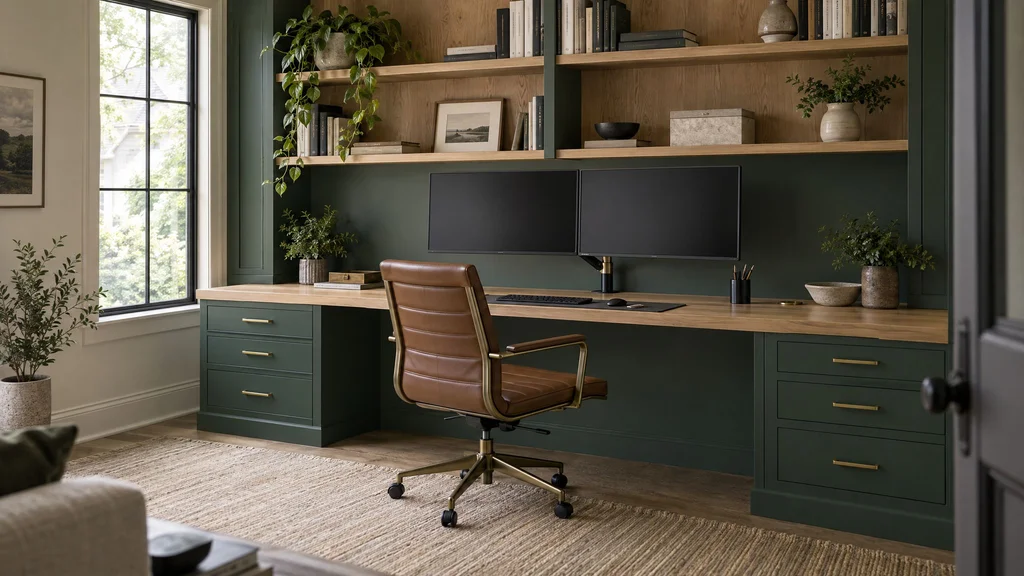
Nobody plans a home office the way they plan a kitchen, and it shows. Most of the ones we are asked to fix started as a catalog desk against a wall, a power strip on the floor, and a bookcase that almost reaches the ceiling. This guide is for homeowners, architects, and designers who want to do it properly: custom home office built-ins that fit the room, hide the cables, hold two monitors and a decade of paper, and look right behind you on a video call, whether the room is in a Manhattan pre-war, a Montclair colonial, or a Westchester house.
One opinion up front. A home office is the most equipment-dependent millwork in a house. A kitchen has to fit a 36-inch range; an office has to fit your monitors, chair, printer, paper, and the way you sit for eight hours. Get the equipment list right and the design mostly follows. Skip it and you get a 22-inch-deep desk with a screen six inches from your face.
1. What a built-in office solves that furniture can’t
Freestanding furniture is the right answer more often than a millwork shop likes to admit. If you rent, expect to move within three years, or suspect the room may go back to being a bedroom, buy a good desk and a better chair. We build freestanding desks as custom furniture for exactly that client. Built-ins earn their cost when the room itself is the problem:
- Cables. Furniture leaves them on the floor. A built-in runs them through a chase behind the drawers, into a tray under the top, and out through one grommet.
- Odd alcoves. Pre-war apartments are full of 38-inch recesses beside a chimney breast. Nothing from a catalog fits them.
- Two people. A partner desk with 30 inches of knee space each only exists if someone draws it.
- The video-call backdrop. The wall behind your chair is now the most photographed wall in the house.
- Paper. Tax returns and closing documents still exist on paper. Two letter-width file drawers hold about 1,200 sheets each.
Our shorter post on designing a home office that works as hard as you do covers the basics.
2. Configurations that work
Single wall with uppers
The default: a 24- to 30-inch-deep desk with drawer pedestals, 12-inch-deep uppers or open shelves above, and a gap between for the monitors. Works in 8 to 14 linear feet.
L-shaped
A shallower 20- to 24-inch leg on the adjacent wall for a printer or a second screen. The inside corner is useless for seating but right for a tower or UPS.
Partner desks
Two people on one wall need 60 inches each; two facing across a peninsula need a 60-inch-deep top with a shared cable trough. We settle who sits where first, because the person facing the window loses the camera.
Window-wall desks
The best daylight and the worst video backdrop. Sill height decides it: a 30-inch sill lets the top run under it; a 24-inch sill means the top floats in front of the glass.
The cloffice
A reach-in closet, doors removed, becomes a 24-inch-deep desk with shelving above and a pocket door to close it at night. We wrote a dedicated piece on converting a closet into a home office.
Library-office
Floor-to-ceiling shelving on two or three walls with the desk built in: the most expensive configuration and the one that reads as architecture. Our guides to floor-to-ceiling library walls and study and den built-ins cover the proportions.
Murphy bed with office
For the guest room that is an office 350 days a year. The desk folds with the bed on a shallow 20-inch top, or sits on the adjacent wall so the bed drops clear. See Murphy beds with integrated closets.
Dining room that becomes an office
A built-in sideboard at 36 inches with file drawers behind sideboard doors and shelving above; the table is the desk. The trick is making the office invisible by 7 p.m.
Kids’ homework stations
A 26-inch desk for a child under ten is wrong by thirteen. We build at 29 inches with an adjustable chair and footrest, and open cubbies that can take doors later. For a full-wall family example, see our Wayne, NJ home office.
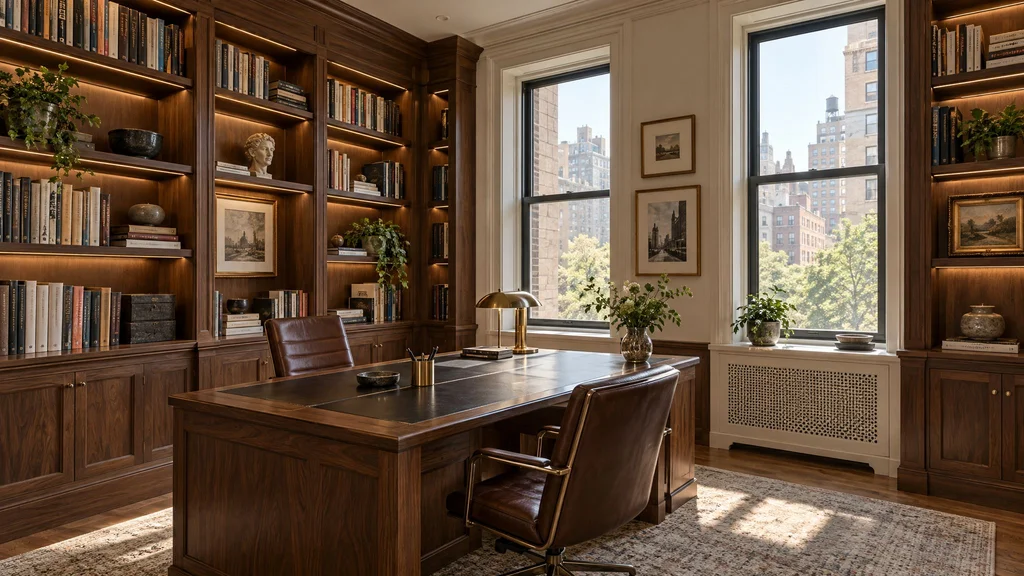
3. Ergonomics and the dimensions we build to
These are the numbers we start from on every office drawing. They move for a very tall or short client; they never get ignored.
| Element | Why it matters | Our standard |
|---|---|---|
| Seated desk height | Forearms level with keyboard | 28½–30" (29" default) |
| Knee clearance width | Per person, between pedestals | 30" minimum, 36" preferred |
| Knee clearance depth | Knees at 18", toes at 24" | 24" clear under the top |
| Desk depth | Monitor at arm’s length | 27–30" (24" only with arms) |
| Chair clearance behind desk | Roll back and stand | 36" minimum, 42" if a walkway |
| Underside of uppers above desk | Clear a 27" monitor on an arm | 22" minimum, or uppers set back |
| Printer bay | Typical desktop laser or inkjet | 22" W × 20" D × 14" H |
The 22-inch upper clearance is the one most often broken. A 27-inch monitor on an arm puts its top edge around 20 inches above the desk and needs room to tilt. The alternative is a 12-inch-deep upper set back so the monitor sits in front of it.
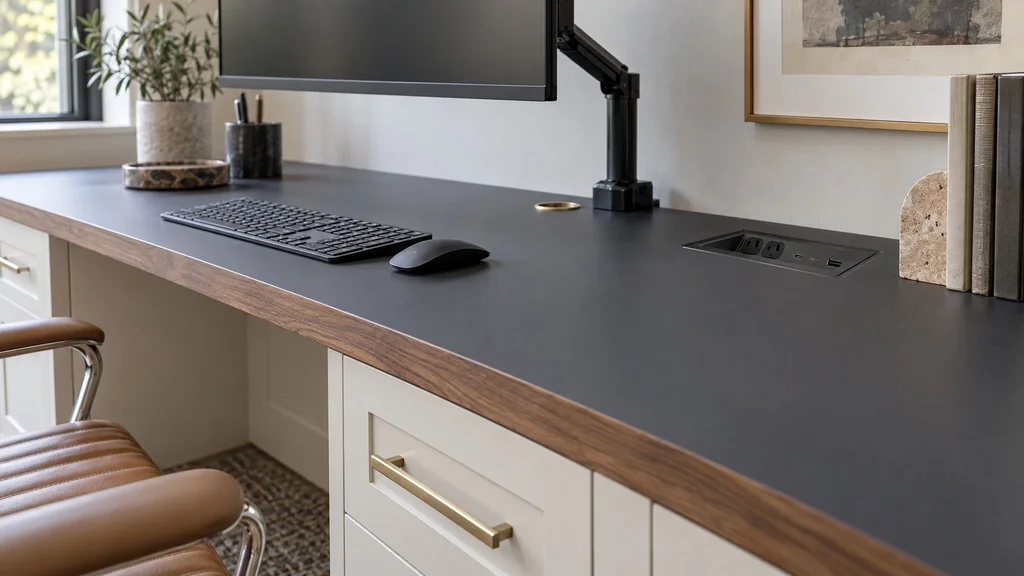
Monitor arms need something to grip: 2 to 3 inches of flat top at the rear edge and a substrate that takes the leverage. A 3/4-inch veneered MDF overhang will crush, so we thicken the rear of the top to 1½ inches or bolt a grommet-mount arm through a steel plate.
Standing-desk inserts are now a regular request. Inside millwork that means commercial lift columns (Linak or LOGICDATA) under a floating section of top, the fixed cabinetry on either side held back a 3/8-inch reveal, and a cable loop sized for 25 inches of travel. If a client only stands occasionally, a fixed 42-inch counter at the end of the run is cheaper and never breaks.
The most common call we get about someone else’s office is not about the millwork. It is “the monitor doesn’t fit.” That is a drawing problem, solved by measuring the screen before the wall.
4. Power, data, and cable management
This is where built-ins beat furniture outright. We draw every outlet, cable path, and switch on the shop drawings; the electrician roughs in before we install and connects after.
- Grommets. One 80 mm grommet per workstation at the rear of the top, in line with the monitor arm. Brushed grommets hide the hole better than capped ones.
- Cable trays. A steel mesh tray 4 inches under the top carrying the power strip and every transformer. Nothing touches the floor.
- Outlets in cabinets. A duplex in the printer bay, one in the UPS cabinet, one inside a charging drawer. In NYC that means a licensed electrician and a filing.
- In-desk power. A flush unit with two receptacles and USB-C at the back edge. Buy the commercial-grade one; the cheap version fails in a year.
- Ethernet. Hardwire the main machine. A Cat6 drop to a jack in the cable tray costs little at rough-in.
- UPS. On the floor of a base cabinet with a louvered door or a 1-inch gap at the toe kick. They run warm.
- Charging drawer. A 4-inch-high drawer with a receptacle at the back and a notched cord pass-through.
- Switches. Shelf and task lights switch from the desk, not the door.
On acoustics: a hard, open shelving wall behind you makes a call sound like a stairwell. Books and closed doors absorb; a fabric-wrapped pinboard between desk and uppers absorbs more. Soft-close hardware matters too; the microphone hears every drawer.
5. Storage: files, printers, books, and what to hide
File drawers
A letter-size hanging file needs 12½ inches of clear interior width; legal needs 15½. Interior height is 10½ inches minimum. A loaded 21-inch file drawer weighs 60 to 90 pounds, so it goes on full-extension slides rated for at least 100: Blum Movento at the 130-pound rating or an Accuride 3832. A 75-pound slide feels fine on install day and sags by spring.
Lateral files
Two rows of letter folders side by side in a 36-inch drawer: faster to scan, and the wide front looks right in a long credenza. The load goes up again: 150-pound slides and a 3/4-inch plywood bottom.
Printer pull-outs
A printer in a closed cabinet needs a pull-out shelf on 100-pound slides so you can load paper and reach the ports, 4 inches of clearance behind, and a vented back.
Open versus closed
We aim for roughly 60 percent closed, 40 percent open: open shelving for books and what you want on camera, closed for everything else, because clutter is cumulative. Concealed hinges with touch latches keep the elevation clean; what to specify is in our guide to soft-close drawers and hinges.
Safes and hidden storage
A document safe bolts through the cabinet floor into the subfloor behind a matching door. Hidden storage that gets used: a 3-inch drawer in the toe kick for chargers, and a shallow drawer behind a false front above the knee space.
6. Materials and finishes
Painted or wood
Most home offices in NJ houses are painted; most in Manhattan apartments lately are white oak. Painted MDF gives you any Benjamin Moore or Sherwin-Williams color, sprayed in a catalyzed coating rather than brushed wall paint, and hides the joints a long wall is made of. Veneer gives grain and warmth on camera. We lay out the trade-offs in painted versus stained wood and compare the species in walnut versus white oak.
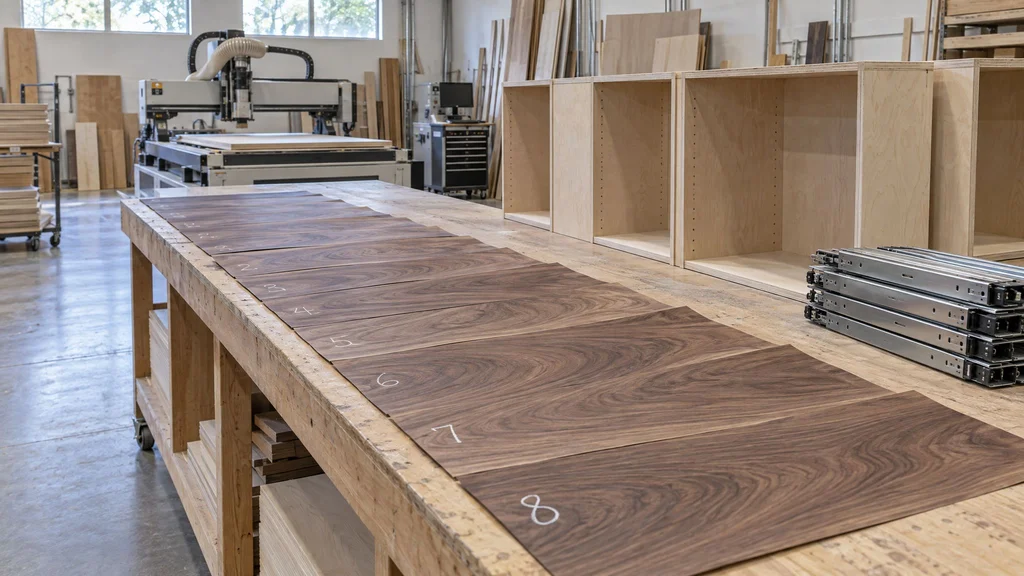
Veneer sequencing on a long wall
A 14-foot walnut wall has twenty or more doors and panels; pulled from random sheets, it looks like twenty pieces of furniture. We buy the flitch and sequence the leaves across the whole elevation before anything is pressed, so the grain walks across the wall.
Desk top materials
- Solid wood (walnut or white oak, 1¼ to 1½ inches): the warmest surface and the one that moves. A 30-inch-deep top shifts about 1/8 inch between steam-heat winter and August humidity, so it is held with slotted clips, never glued to the apron.
- Leather inlay: quiet under a keyboard, marks from a hot mug. For people who write by hand.
- Stone: 2 cm quartzite or marble on plywood. Cold on the forearms, pencils roll, marble etches under coffee. For a partner desk that doubles as a conference table, and little else.
- Fenix NTM: a matte, fingerprint-resistant laminate that heals fine scratches with heat. Our recommendation for anyone who works at the desk all day.
- Painted top: the one we talk clients out of. Coffee rings, laptop feet, and a watch strap show within a year regardless of the coating.
Finishes
Tops get the hardest finish we spray, conversion varnish or 2K polyurethane, which resist heat and solvents far better than pre-catalyzed lacquer. Vertical oak or walnut can take Rubio Monocoat if the client accepts a yearly maintenance coat. Rooms with steam heat and no humidifier are where we steer away from solid wood toward veneer on stable substrates.
7. Lighting and the video backdrop
Three layers: ambient, task, and shelf light. Task light goes under the uppers or in a slot above the monitors, 3000 to 3500K, aimed at the desk and never the screen. Shelf lighting is an LED strip in a recessed aluminum channel at the front of each shelf, 2700 to 3000K, CRI 90 or better, dimmed. Mixed color temperatures look fine in person and wrong on camera, so we hold the office to one.
What the camera sees: mid-tone wood or a deep painted color reads well; a wall of white or gloss laminate blows out and the auto-exposure darkens your face. Shelves one-third full, with objects of varying height, look intentional. A window behind you is the worst backdrop, so the desk faces the window or sits perpendicular to it.
8. Working around the house
Radiators
Most Manhattan offices have a cast iron radiator under the window. The top can run over it with 2 inches of air on every side, a grille of at least 60 percent open area, and a gap at the top so heat escapes. Never put a drawer stack beside a radiator; the wood dries and the gaps open.
Windows and sloped ceilings
We never block the lower sash. In a cape or attic conversion in Montclair or Ridgewood, the knee wall and slope set the shelving depth, and we scribe the top panel to the ceiling on site.
Pre-war walls
Plaster over lath or brick, out of plumb by 3/4 inch over 8 feet, with no studs where you want them. We find the blocking at the field measure, add a scribe strip at every wall junction, and fasten to what is actually there.
Co-op and condo rules
Expect an alteration agreement, a certificate of insurance naming the building, work hours of 9 to 4 on weekdays, padded elevators booked ahead, and in some buildings filed electrical work. We build in sections that fit the service elevator or the stair turn: for a walk-up, nothing over 36 inches wide in one piece.
9. What a home office built-in costs
Home office millwork in the NYC metro runs $700 to $2,800 per linear foot of wall, including fabrication and installation but not electrical work, fixtures, or the chair. The table matches our home office built-in cost guide.
| Configuration | Material | Price per LF |
|---|---|---|
| Simple floating desk + shelves | Painted MDF | $700–$1,100 |
| Full built-in with drawers | Painted MDF | $1,000–$1,600 |
| Full system with filing + shelves | White oak veneer | $1,400–$2,200 |
| Full library-office integration | Walnut veneer | $1,800–$2,800 |
In practice, a 10-foot painted single wall with drawers lands around $10,000–$16,000; a 14-foot L-shaped office in white oak with filing around $20,000–$31,000; a full library-office in walnut or white oak at $35,000–$80,000.
What moves the price
| Add-on | Notes | Typical cost |
|---|---|---|
| Electrical coordination (outlets, data, in-desk power) | Electrician’s work | $200–$1,500 |
| Integrated shelf and task lighting, 12-ft wall | LED, drivers, dimmer, installation | $1,500–$4,000 |
| Lift columns for a sit-stand section | Dual-column set, installed | $1,500–$3,500 |
| Concealed hinges with touch latches | Per door, over standard hardware | $80–$200 |
| Fenix or stone desk top | Per workstation, over veneer | $600–$2,500 |
| Sequenced veneer on a long wall | Flitch purchase and layout | +10–20% on material |
The quiet drivers are drawer count and door count. Open shelving is cheap to build; a wall of drawers on 130-pound slides is not. A fifth-floor walk-up, or a building that limits work to five hours a day, adds a day of labor at $95–$140 per hour per installer.
10. Timeline and installation
From a signed proposal, the field measure happens within a week and shop drawings follow in one to two. Once you approve them, built-ins run 6 to 10 weeks in fabrication; veneer work and sit-stand mechanisms sit at the long end. A single-wall office installs in one to two days; an L-shaped or library-office in two to four. In a co-op, add the board’s approval time, which can be two weeks or two months. Our walkthrough of what happens on site during a millwork installation covers the day itself.
11. Mistakes we see, and the fix for each
- A 22-inch-deep desk. It puts a 27-inch monitor a foot from your face. Fix: 27 to 30 inches, or 24 with monitor arms.
- Uppers that hit the monitor. Fix: 22 inches of clearance, or uppers set back.
- Grommets drilled after the fact. A hole saw through a finished top never looks right. Fix: locate every grommet on the shop drawings.
- A painted desk top. Fix: Fenix, veneer, or solid wood under conversion varnish.
- File drawers on light slides. Fix: 100-pound minimum, 150 for laterals.
- The printer in a sealed box. Fix: pull-out shelf, vented back, outlet inside.
- Forgetting the chair. Armrests at 27 inches do not slide under an apron at 26. Fix: bring the chair model; we size the apron to it.
- A solid top with no room to move. Glued to the apron and screwed tight at both ends, it cups by February. Fix: slotted fasteners and a 1/8-inch gap at each wall.
- Fixed shelves at one spacing. Novels are 8 inches tall, binders 11½, art books 14. Fix: adjustable pins on 32 mm centers.
12. How to brief a millwork shop
The first meeting goes fast if you bring the right things:
- Every piece of equipment with its dimensions: monitors (size and count), laptop and dock, tower, printer model, router, UPS.
- Who uses the room, for how many hours, and whether two people ever work at once.
- Paper volume, counted in file boxes or drawers. Two full drawers today means four in the design.
- What goes on the shelves: linear feet of books, binders, objects.
- Your chair model and your height.
- A photo of your current desk on a normal Tuesday. Not tidied.
- Building rules: alteration agreement, work hours, elevator dimensions.
- A budget range. It decides painted versus veneer and how many drawers; we would rather design to it than guess.
From that we produce a drawing set with every outlet, grommet, and shelf height marked. Our guide to reading millwork shop drawings explains what to check before you sign.
Frequently asked questions
How deep should a built-in desk be?
27 to 30 inches with a monitor on a stand; 24 inches works only with a monitor arm that pushes the screen past the back edge. Shallower than that, the desk is for a laptop only. Depth also sets knee clearance: 24 inches at toe level is the minimum for a full day.
Can a standing desk be built into millwork?
Yes. We use commercial lift columns under a floating section of the top, with fixed cabinetry on either side held back a 3/8-inch reveal so it travels without rubbing. Budget roughly $1,500–$3,500 for the mechanism installed. A fixed 42-inch counter at one end of the run is the simpler alternative.
How much does a custom home office built-in cost in NYC or NJ?
$700 to $2,800 per linear foot installed, depending on material and configuration. A 10-foot painted single wall with drawers typically lands at $10,000–$16,000; a white oak L-shaped office with filing and uppers at $20,000–$31,000; a full walnut library-office at $35,000–$80,000. Electrical work, fixtures, and the chair are separate.
How long does a built-in home office take?
Six to ten weeks in fabrication after you approve shop drawings, plus one to two weeks for the drawings. Installation takes one to two days for a single wall and two to four for a full room. Co-op approvals in Manhattan can add two weeks to two months, so start the alteration agreement early.
Should a home office be painted or wood?
Painted MDF suits traditional houses and tighter budgets, offers any color, and hides the joints on a long wall. White oak or walnut veneer reads warmer on camera, hides scuffs, and costs 40 to 75 percent more. Either way, make the desk top a hard material: Fenix, veneer, or solid wood under conversion varnish.
Will built-ins hurt resale?
A well-proportioned office in a dedicated room generally helps; buyers read it as finished space. The risk is a bedroom converted so completely that it no longer reads as one. We keep the closet, avoid blocking windows, and design guest-room offices so the desk section can come out and the shelving stays.
Can a built-in office work in a pre-war co-op?
Yes; many of ours are. The work is in the field measure, scribing to plaster walls that are out of plumb, leaving airspace around radiators, and building in sections that fit the service elevator. Expect an alteration agreement, insurance, restricted hours, and electrical work filed by a licensed electrician.
If you are planning an office, a study, or a library wall anywhere in New Jersey, New York City, Westchester, or Connecticut, our architectural millwork team will measure the room, draw it to your equipment, and build it in Little Falls. Call (201) 281-1457, or send us the equipment list and a photo of the room.